
Troubleshooting
Follow the request from the browser to the backend and broker, then check the active subscription.
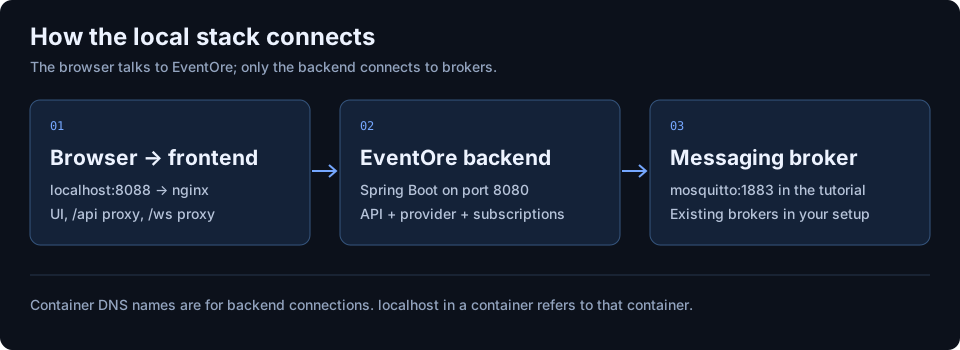
The console or API will not start
For the MQTT lab, run:
docker compose -f docs/examples/mqtt-compose.yaml ps
docker compose -f docs/examples/mqtt-compose.yaml logs --tail=100 eventore-backend eventore-frontend
curl http://localhost:8080/actuator/health/readiness
If image compilation failed, read the build output before investigating networking. If a port is occupied, stop the conflicting service or update the host port and corresponding frontend WebSocket URL together. A successful readiness response indicates the application is ready, not that every saved broker profile is valid.
Requests return 401 or actions are unavailable
For a 401, enter the configured API token in Settings, or add a Bearer header to REST requests. For missing write controls, inspect GET /api/v1/config and the deployment mode. ReadOnly disables writes; Dev excludes broker administration. Broker-level authorization is separate from EventOre API authentication.
Connection validation fails
- Check the protocol module is installed and enabled.
- Check the broker address from the backend’s network, not from your browser.
- Check broker credentials, TLS trust, and required permissions.
- For Kafka, check every advertised broker address. A reachable bootstrap address is insufficient if metadata advertises unreachable hosts.
The repository’s development Redpanda service advertises localhost:9092 for a host-run backend. That address is unsuitable for a backend in another container. Configure appropriate advertised listeners before combining those stacks. The MQTT lab avoids this by using a single Compose network and the service name mosquitto.
A stream is connected but no messages arrive
Check the stream’s status and destination, not just the WebSocket indicator. Start the subscription before publishing a test message. Confirm topic filters and broker read permissions. Queue consumers may compete for deliveries; Kafka consumer groups affect assignment. Read the provider guide before observing a production queue.
The WebSocket keeps reconnecting
Check frontend.env.wsUrl in Helm or EVENTORE_WS_URL in Docker. An HTTPS site needs wss://. Verify proxy upgrade headers, allowed origins, and idle timeouts. If multiple backend replicas are running, subscriptions remain process-local; inspect session routing and affinity.
Connections disappear after restart
Persistence is disabled by default. emptyDir can survive a container restart within the same pod, but not pod replacement. Use a retained PVC for the single-replica file store. Confirm the configured file path points into the mounted volume and the process can write there.
Kubernetes workloads stay pending or cannot reach brokers
kubectl -n eventore get pods,pvc,svc
kubectl -n eventore describe deployment eventore-backend
kubectl -n eventore logs deployment/eventore-backend --tail=100
kubectl -n eventore get events --sort-by=.lastTimestamp
For a pending PVC, check StorageClass provisioning and access modes. For image pull failures, verify the image tag and registry access. If network policy is enabled, inspect broker egress and DNS separately: the current chart’s egress policy does not include an explicit DNS rule. Have the cluster operator provide the resolver access required by that cluster.
Collect a useful issue report
Include the image tag or commit, deployment mode, protocol, topology, exact UI steps, response status, and a small sanitized log excerpt. Remove tokens, connection secrets, customer payloads, and private hostnames. State whether the issue reproduces in the local lab. Use the project issue tracker.