
Streaming & live view
Multi-topic WebSocket workspace, filters, timed windows, and export.
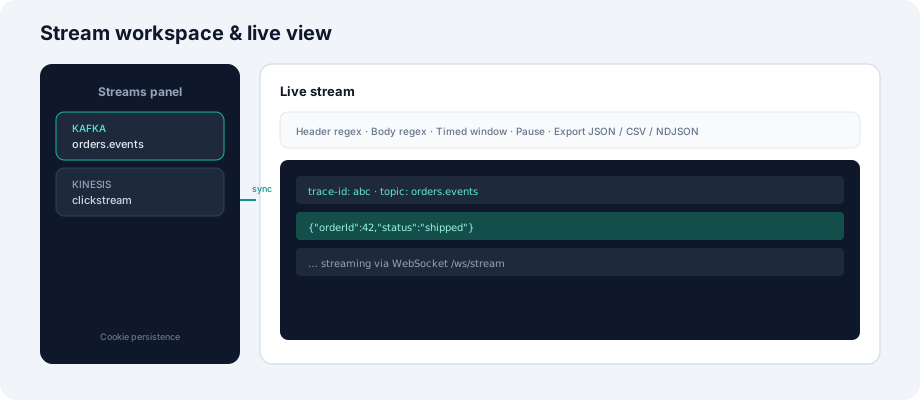
Stream workspace
The Streams side panel is your persistent workspace:
- Add streams from Browse (topic/queue + connection).
- Each stream shows protocol, connection name, and destination.
- State is saved in browser cookies so sessions survive refresh.
Live view
Open Live Stream to subscribe to all streams in the workspace over a single WebSocket.
| Feature | Description |
|---|---|
| WebSocket | ws://host/ws/stream — primary path for low latency |
| SSE fallback | Used when WebSocket is blocked by proxies |
| Header filter | Regex on message headers (per stream or global) |
| Body filter | Regex on payload text |
| Timed window | Limit history to last N minutes |
| Pause | Buffer incoming messages without losing the subscription |
Publish from live view
When deployment mode allows PUBLISH, send test messages to the active destination with optional headers. DEV mode enforces max-publish-bytes.
Export
Export captured messages from the live panel:
- JSON — structured array
- NDJSON — one object per line for pipelines
- CSV — spreadsheet-friendly columns
WebSocket protocol (conceptual)
Client → Server: subscribe { connectionId, destination, filters? }
Server → Client: message { headers, body, timestamp, streamId }
Client → Server: unsubscribe | update filters
Data plane handles all broker reads; control plane must have the connection’s protocol registered or subscribe returns an error.